![SA Seeking Alpha Logo - Main_W.svg]](https://help.seekingalpha.com/hubfs/SA%20Seeking%20Alpha%20Logo%20-%20Main_W.svg)
Premium subscribers have the ability to screen stocks using ~ 100 criteria like Dividend Yield, Revenue Growth, Price Performance, and many more.
Click on "Stock Screener" (as shown below).
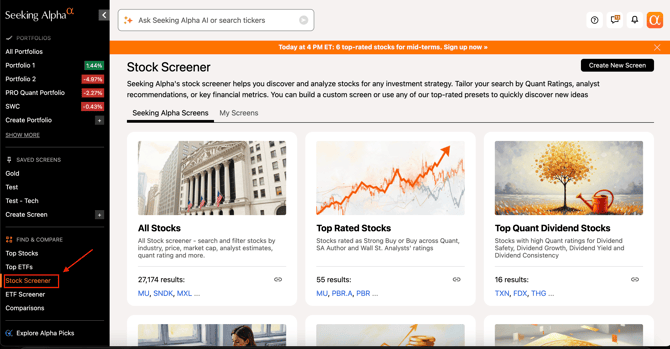
Click on the "Create New Screen" button at the top right of the "Stock Screener" page.

You can create a filter based on categories listed below such as "Ratings", "Quants", "Trading", "Dividend Grades", "Earnings", etc.
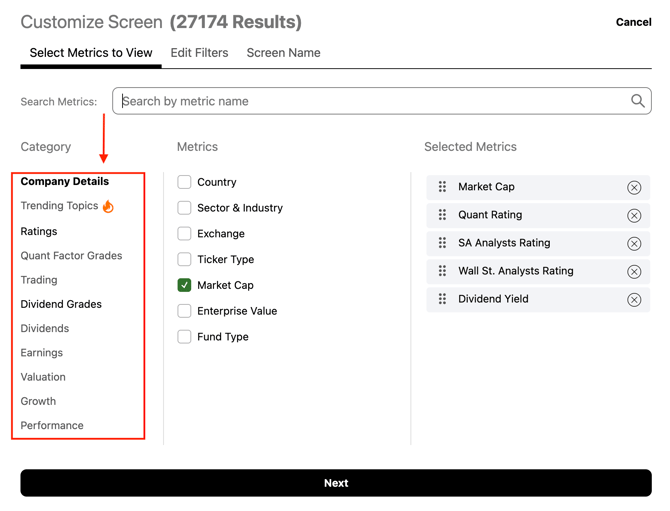
You can further filter down the categories by clicking on them as shown below.
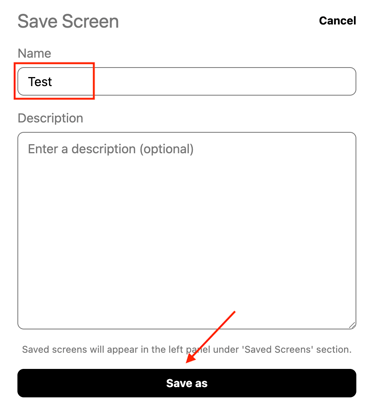
After creating a filter you can even save it and name it according to your preference.

If you are not a subscriber to Premium yet, you can experience our full range of subscriber-only features by signing up for Premium.