![SA Seeking Alpha Logo - Main_W.svg]](https://help.seekingalpha.com/hubfs/SA%20Seeking%20Alpha%20Logo%20-%20Main_W.svg)
Want to set up rating alerts? Learn how to configure rating alerts so you will be notified when a stock falls below or rises above a target rating.
How to Set up Rating Alerts
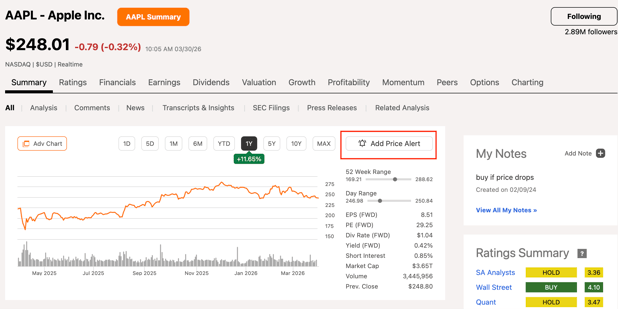
Step 1: Go to the main symbol page and click on the "Add Price Alert" icon as shown below.
Step 2: Input the trigger price and click "save".
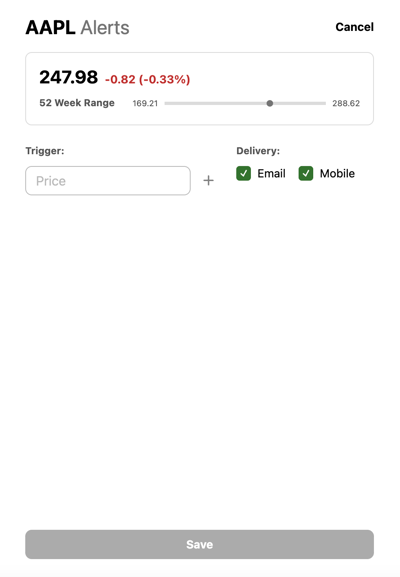
Step 3: Click on Save, and your alert will be saved.
How to Edit Rating Alerts
You can edit your alert settings by going to the settings page directly by clicking on the link https://seekingalpha.com/account/edit_price_alerts.
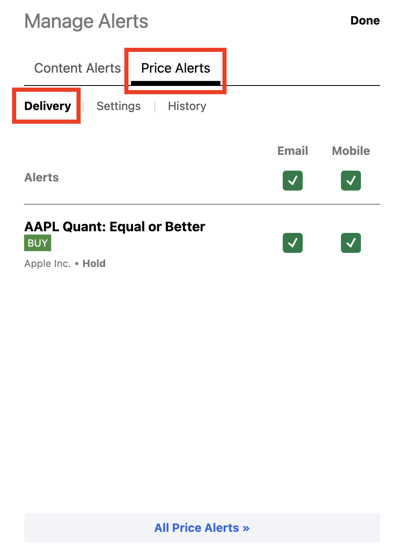
Or, you can do it via the Portfolio page. First, go to your "Portfolio" and select the Portfolio that you want to edit, and click on "Manage Alerts".

A. By Clicking on "Delivery" you can enable or disable the alerts on Mobile/Email.
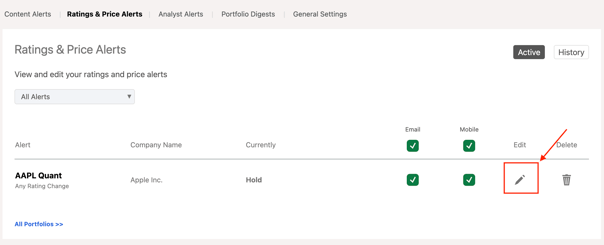
B. By clicking on "pencil" icon you can change the trigger price.
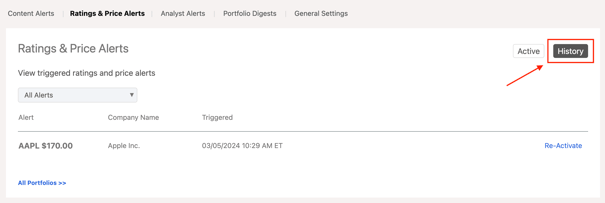
C. And, on the "History" tab, you will see all the alerts received so far.
Please email us at subscriptions@seekingalpha.com if you need any help.
If you haven't subscribed to Premium yet, you can unlock access to our subscriber-only features by signing up here.